
Most organizations believe they’ve taken the right steps. Strong passwords, multi-factor authentication, geo-IP blocking, maybe even risky sign-in alerts. Those are all smart security moves. But they share a common blind spot, and attackers have figured out how to exploit it.
It’s called token theft, and understanding how it works is the first step toward making sure your defenses actually hold.
How Token Theft Works
First, an employee clicks on something they shouldn’t: a convincing phishing email, a fake document link, or a spoofed login page. The payload is so small that traditional antivirus and endpoint protection don’t flag it.
No alarm bells. No quarantine.
But in that moment, the attacker captures something far more valuable than a password. They capture an authentication token that includes both the user’s credentials and their multi-factor authentication session. That one click hands the attacker the keys to the entire Microsoft 365 account, including emails, files, and Teams, without triggering an MFA prompt again.
This risk isn’t theoretical. Token theft has rapidly become one of the leading attack vectors against Microsoft 365 environments, with adversary-in-the-middle phishing attacks surging over the past year.
According to Verizon’s 2025 Data Breach Investigations Report, token theft was the most popular attack type focused on bypassing MFA. The report stated, “Once again, this supports the tried-and-true notion that as our defenses shift, so do the attackers’ processes. Having MFA enabled continues to be the gold standard to help protect against authentication abuse, but having it enabled should not make your detection and monitoring processes complacent.”
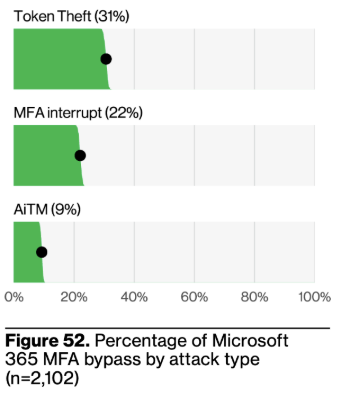
In addition, the FBI has issued warnings about emerging phishing-as-a-service platforms that automate the entire process, capturing authentication tokens and bypassing MFA entirely. No password or MFA code required.
Why Your Existing Defenses Don’t Catch It
The value of MFA isn’t in question. But not all MFA methods provide the same level of protection. SMS-based authentication, for example, introduces its own set of risks—ranging from SIM swapping to interception—which we’ve outlined in more detail in our guide on why SMS 2FA isn’t enough.
What’s changed is the sophistication of the attacks targeting MFA overall. Rather than breaking through MFA, attackers now steal the session token it produces after a successful login. That token carries everything they need to move through your Microsoft 365 environment undetected, and without a new authentication attempt to flag, your geo-IP rules and sign-in policies have nothing to catch.
The Path from Token Theft to Business Email Compromise
What happens next is textbook. Almost immediately after a successful token theft, the attacker sets up a hidden inbox rule, often with a single-character name or something completely inconspicuous, designed to silently redirect or suppress specific emails.
This is the setup for a man-in-the-middle attack on your email communications. The user has no idea. The attacker monitors conversations, waits for the right moment, and strikes, redirecting payments, harvesting sensitive data, or impersonating the compromised user.
This is a common scenario for business email compromise today. It’s one of the main areas clients engage our managed cybersecurity services for, and it remains the most financially damaging type of cyberattack.
What Native Microsoft Tools Can and Can’t Do
Native Microsoft tools can help, but they aren’t a complete solution on their own. Responses to sign-in alerts aren’t in real-time. Conditional access policies are complex to configure and maintain. And most organizations simply don’t have the resources or expertise to monitor, tune, and respond to every signal Microsoft generates. Left unaddressed, attackers get exactly what they came for.
How to Close the Gap
The good news? This problem is solvable with a few tweaks and the right expertise. Specialized monitoring tools exist that watch for the exact indicators of a token theft compromise, suspicious session activity, unauthorized inbox rules, anomalous sign-in behavior, and pair that detection with a 24/7 Security Operations Center that can neutralize the threat in real time.
Sessions are revoked, accounts are secured, and malicious rules are deleted — all before the attacker can act. The solution isn’t complicated. But it does require initiative, the right partner, and an honest understanding of the risk you’re carrying without it.
If your cybersecurity strategy starts and ends with MFA, it’s time to have a deeper conversation. Contact Anders for tailored recommendations to reduce your risk.